Infracost FinOps
The Infracost CLI tool parses Terraform files and estimates costs for your infrastructure.
Overview
This guide will show you how to:
- Run the Infracost CLI in Semaphore
- Comment Git commits with cost deltas
- Comment pull requests with cost deltas
- Fail the CI pipeline if costs exceed a custom-defined policy
Prerequisites
For this guide, you will need the following:
- A working Semaphore project with a CI pipeline
- At least one Terraform file in your project
- An Infracost API key. You must sign up with a free account to obtain it
- A GitHub, Bitbucket, or GitLab API key with permission to write comments in the repository
Adding a baseline to the repository
In order to estimate deviations from the expected cost, you must store a baseline file in your repository. The following command will generate baseline.json based on all the Terraform files found in your project folder:
infracost breakdown --path . --format json --out-file baseline.json
Now you can push baseline.json into your repository.
Storing the API keys in secrets
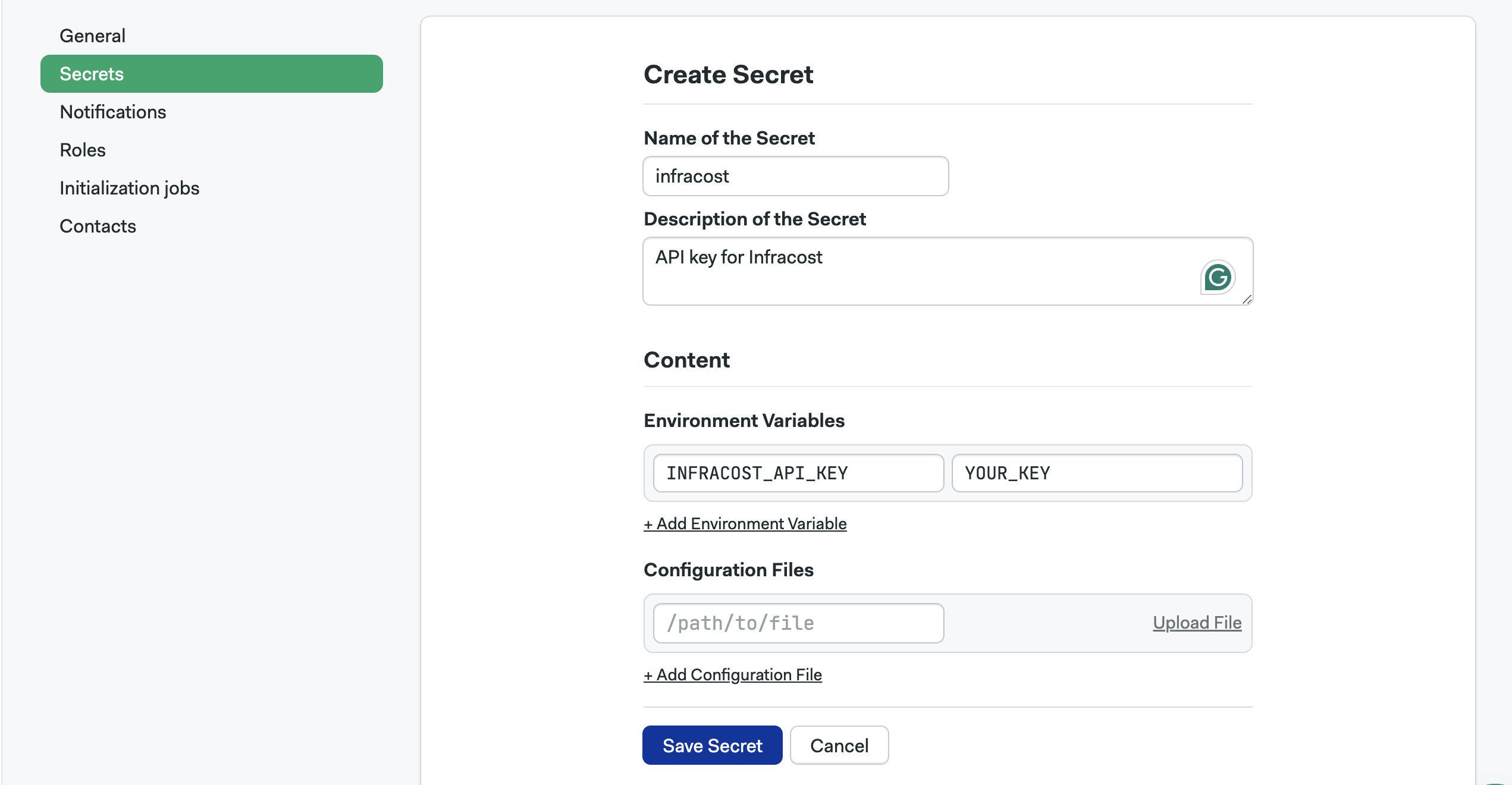
Follow the Infracost getting started guide to install the CLI tool on your machine and obtain an API key. Create a secret in Semaphore to store it:
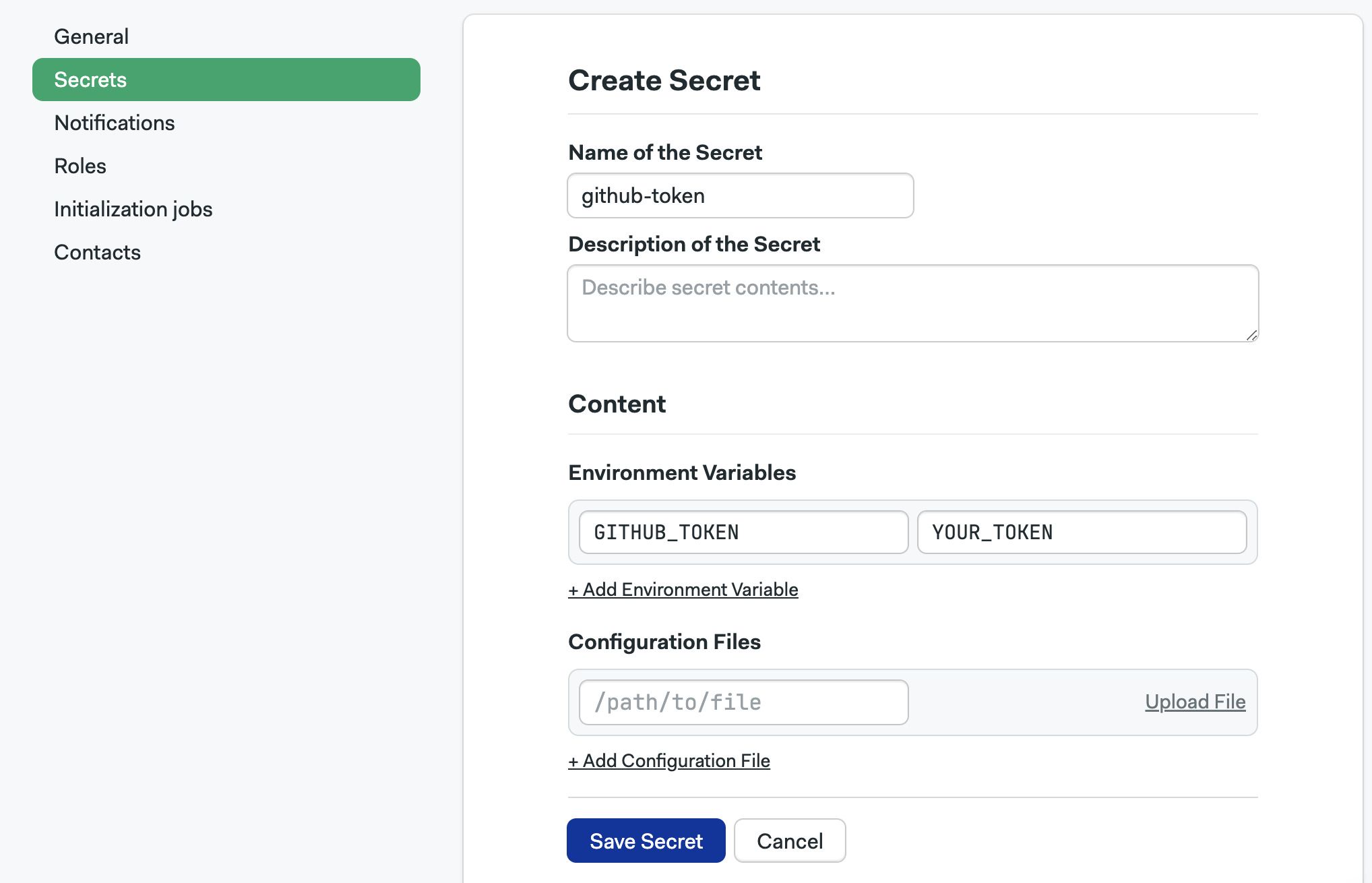
Create a token for your Git provider:
- GitHub: create a token with write permissions on your repository
- BitBucket: create an app password with write permissions
- GitLab: create an access token with
write_repositorypermissions
Store the access token in Semaphore:
Adding cost estimates to commits
When Infracost runs in your CI/CD workflow, it can post comments in commits and pull requests with the estimated cost difference from the baseline or between branches.
Estimates on GitHub
Before you can calculate cost differences in commits or peer reviews, you need to establish a baseline. If you have any usage-based resources such as serverless functions, you need to first create an usage file.
infracost breakdown --sync-usage-file --usage-file usage.yml --path .
Now, edit usage.yml to add your usage estimates for the moth.
Next, you're ready to create a baseline file. Skip --usage-file if you're not using any usage-based cloud resources:
infracost breakdown --path . --format json --usage-file usage.yml --out-file baseline.json
After checking in all the new files into the repository, edit the pipeline to run the cost analysis. Use the following commands in your CI job to post a comment on GitHub with the cost delta between the current commit and the baseline:
curl -fsSL https://raw.githubusercontent.com/infracost/infracost/master/scripts/install.sh | sh
checkout
infracost diff --path . --format json --compare-to baseline.json --out-file /tmp/infracost-diff-commit.json
infracost comment github --path=/tmp/infracost-diff-commit.json --repo=$SEMAPHORE_GIT_REPO_SLUG --commit=$SEMAPHORE_GIT_SHA --github-token=$GITHUB_TOKEN --behavior=update
Commenting on BitBucket
Use the following command in a job to comment on BitBucket the difference in cost between the current commit and the baseline:
curl -fsSL https://raw.githubusercontent.com/infracost/infracost/master/scripts/install.sh | sh
checkout
infracost diff --path . --format json --compare-to baseline.json --out-file /tmp/infracost-diff-commit.json
infracost comment bitbucket --path=/tmp/infracost-diff-commit.json --repo=$SEMAPHORE_GIT_REPO_SLUG --commit=$SEMAPHORE_GIT_SHA --bitbucket-token=$BITBUCKET_TOKEN --behavior=update
Commenting on GitLab
Use the following command in a job to comment on GitLab the difference in cost between the current commit and the baseline:
curl -fsSL https://raw.githubusercontent.com/infracost/infracost/master/scripts/install.sh | sh
checkout
infracost diff --path . --format json --compare-to baseline.json --out-file /tmp/infracost-diff-commit.json
infracost comment gitlab --path=/tmp/infracost-diff-commit.json --repo=$SEMAPHORE_GIT_REPO_SLUG --commit=$SEMAPHORE_GIT_SHA --gitlab-token=$GITLAB_TOKEN --behavior=update
Adding cost estimate to pull requests
A separate job can also be created to post comment on pull requests. This allows the reviewer to quickly assess the cost changes between branches.
Estimates on GitHub
The following example calculates the cost change between the master and the branch that triggered the workflow in GitHub:
curl -fsSL https://raw.githubusercontent.com/infracost/infracost/master/scripts/install.sh | sh
checkout
git checkout master
infracost breakdown --path . --format json --out-file /tmp/infracost-master.json
git checkout FETCH_HEAD
infracost diff --path . --format json --compare-to /tmp/infracost-master.json --out-file /tmp/infracost-diff-master.json
infracost comment github --path=/tmp/infracost-diff-master.json --repo=$SEMAPHORE_GIT_REPO_SLUG --pull-request=$SEMAPHORE_GIT_PR_NUMBER --github-token=$GITHUB_TOKEN --behavior=update
Estimates on BitBucket
The following example calculates the cost change between the master and the branch that triggered the workflow in BitBucket:
curl -fsSL https://raw.githubusercontent.com/infracost/infracost/master/scripts/install.sh | sh
checkout
git checkout master
infracost breakdown --path . --format json --out-file /tmp/infracost-master.json
git checkout FETCH_HEAD
infracost diff --path . --format json --compare-to /tmp/infracost-master.json --out-file /tmp/infracost-diff-master.json
infracost comment bitbucket --path=/tmp/infracost-diff-master.json --repo=$SEMAPHORE_GIT_REPO_SLUG --pull-request=$SEMAPHORE_GIT_PR_NUMBER --bitbucket-token=$BITBUCKET_TOKEN --behavior=update
Estimates on GitLab
The following example calculates the cost change between the master and the branch that triggered the workflow in GitLab:
curl -fsSL https://raw.githubusercontent.com/infracost/infracost/master/scripts/install.sh | sh
checkout
git checkout master
infracost breakdown --path . --format json --out-file /tmp/infracost-master.json
git checkout FETCH_HEAD
infracost diff --path . --format json --compare-to /tmp/infracost-master.json --out-file /tmp/infracost-diff-master.json
infracost comment gitlab --path=/tmp/infracost-diff-master.json --repo=$SEMAPHORE_GIT_REPO_SLUG --pull-request=$SEMAPHORE_GIT_PR_NUMBER --gitlab-token=$GITLAB_TOKEN --behavior=update
Enforcing policies
Infracost can be used to enforce cost policies with continuous integration. When a policy is used, the Infracost CLI will return a non-zero exit status, stopping the pipeline and preventing a deployment that would run over the budget.
First, we must create a policy file and push it into the repository. To learn about the policy syntax, read the cost policies docs on Infracost.
The following example sets a maximum budget of USD 1000 per month:
# policy.rego

package infracost

deny[out] {

    # define a variable
  maxMonthlyCost = 1000.0

  msg := sprintf(
    "Total monthly cost must be less than $%.2f (actual cost is $%.2f)",
    [maxMonthlyCost, to_number(input.totalMonthlyCost)],
  )

    out := {
      "msg": msg,
      "failed": to_number(input.totalMonthlyCost) >= maxMonthlyCost
    }
}
To evaluate the policy file, you must add the --policy-path POLICY_FILENAME option to any of the comment commands. For example:
# calculate difference between commit and baseline
infracost diff --path . --format json --compare-to baseline.json --out-file /tmp/infracost-diff-commit.json

# enforce policy
infracost comment github --path=/tmp/infracost-diff-commit.json --repo=$SEMAPHORE_GIT_REPO_SLUG --commit=$SEMAPHORE_GIT_SHA --github-token=$GITHUB_API_KEY --behavior=update
Tips for using Infracost
- You can use monorepo conditions like
change_in('/**/*.tf')orchange_in('/**/*.tfvars')to run Infracost only when Terraform files change - You can create a config file manage monorepo workflows provide utilization forecast for per-usage services such as AWS lambda
- You can add a badge to your repository with the estimated monthly cost